That little glowing light on your dashboard can be scary. It’s called the check engine light. For many drivers, it causes instant worry. What’s wrong? Is it serious? How much will it cost?
But what if you could understand what your car is trying to tell you? That’s where an OBD-II scanner comes in. This guide will explain OBD-II scanner codes in simple terms. Think of it as learning your car’s secret language.
What Are OBD-II Scanner Codes?
First, let's break down the name.
-
OBD stands for On-Board Diagnostics. It's your vehicle's built-in computer system.
-
The "II" means it's the second, standard version used in all cars made since 1996.
-
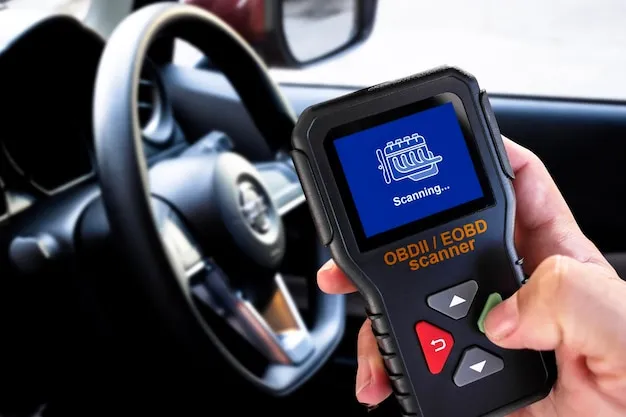
A scanner is a tool that talks to this computer.
-
Codes are the messages it finds.
When a sensor in your car notices a problem, it sends a message to the main computer. The computer then turns on the check engine light and saves a diagnostic trouble code (DTC). An OBD2 code reader can read these messages.
You can think of it like this:
-
Your car’s computer is a doctor.
-
The sensors are its eyes and ears.
-
An OBD-II scanner is the stethoscope the doctor uses to figure out what’s wrong.
-
The OBD-II codes are the doctor’s notes about your car’s health.
The OBD-II Scanner Codes Guide: Breaking Down the Basics
To read car diagnostic codes, you need to know how they are built. Don't worry, it's a simple pattern.
How to Read OBD2 Codes
A standard code has one letter followed by four numbers (Example: P0123).
-
The First Letter (The System): This tells you which part of the car has the issue.
-
P = Powertrain (Engine, transmission, fuel system)
-
B = Body (Airbags, power windows, seats)
-
C = Chassis (ABS brakes, steering)
-
U = Network (Wiring between computers)
-
-
The First Number (Code Type):
-
0 = A generic code, the same for all car brands.
-
1 = A manufacturer-specific code, unique to your car's brand.
-
-
The Second Number (Sub-System): This points to a more specific area, like fuel/air or ignition.
-
The Last Two Numbers: These identify the exact problem.
Understanding Common OBD2 Trouble Code Categories
Let’s look at some frequent code types you might see. Knowing these categories helps you understand the urgency.
P0xxx Codes: Generic Powertrain Issues
These are the most common check engine light codes. All car makers use the same definitions.
-
P0300: Random/Multiple Cylinder Misfire Detected. This means the engine is shaking or stumbling.
-
P0420: Catalyst System Efficiency Below Threshold. This often points to a failing catalytic converter.
-
P0171: System Too Lean (Bank 1). The engine is getting too much air or not enough fuel.
P1xxx Codes: Manufacturer-Specific Powertrain
These are unique to your car's brand. You’ll often need the car’s manual or a trusted online database to look these up, as they can vary.
B, C, and U Codes: Body, Chassis, and Network
While less common for basic scanners, these relate to other systems.
-
C codes might relate to your anti-lock braking system (ABS).
-
U codes often point to communication errors between modules, sometimes fixed by simply resetting the system.
Using Your OBD-II Code Reader: A Simple Step-by-Step Guide
Using a basic automotive scan tool is easier than you think. Here’s how to do it safely.
Step 1: Locate Your Vehicle's OBD2 Port
This is usually found under the dashboard on the driver’s side, near the steering column. It’s a 16-pin trapezoid-shaped connector. You can’t plug it in wrong!
Step 2: Connect Your Scanner and Turn the Key
Plug your code scanner into the port. Turn your car’s ignition to the “ON” position (you don’t need to start the engine). The scanner will power on.
Step 3: Read the Diagnostic Trouble Codes
Navigate the scanner’s menu (usually just a button or two) to “Read Codes.” Your screen will display any stored DTCs. Write them down! The code itself is the most important piece of information.
Step 4: Research and Understand the Codes
Take the codes you found and look them up. A simple web search for “P0300 Ford F-150” will give you real-world advice from mechanics and drivers who have fixed the same issue.
What to Do After You Pull the Codes
Finding the code is only half the battle. Here’s your action plan.
Clearing Check Engine Light Codes: Should You Do It?
Your scanner has a “Clear Codes” function. This turns off the light. But use this carefully.
-
Do Clear the Code: If you have diagnosed and fixed the problem. Clearing the code lets you see if it comes back.
-
Don’t Clear the Code: Just to make the light go away. If the problem isn’t fixed, the light will come back on. Mechanics also need to see if the code returns during a test drive.
When to Seek Professional Mechanic Help
An OBD-II scanner is a great diagnostic tool, not a magic fix-it box. Here’s when to call a pro:
-
If the code indicates serious issues like internal engine problems (P0016), major transmission faults, or airbag (B) codes.
-
If you don’t feel comfortable doing the repair.
-
If you clear a code and it comes back immediately.
As veteran mechanic and shop owner, David Regal, often says: “A code tells you the ‘what,’ not always the ‘why.’ A P0171 lean code could be a $20 vacuum hose or a $400 fuel pump. The scanner gets you to the neighborhood, but sometimes you need a pro to find the right house.”
Choosing the Best OBD2 Scanner for Your Needs
Not all scanners are the same. Picking the right one depends on what you want to do.
Basic Code Readers vs. Advanced Diagnostic Tools
-
Basic Code Readers: These are affordable and perfect for reading and clearing standard powertrain codes. They answer the “what is it?” question for most check engine lights.
-
Advanced Scan Tools: These can read ABS codes, SRS (airbag) codes, and perform special tests. They are used by serious DIYers and professionals.
Smartphone OBD2 Adapters and Apps
These are small Bluetooth or Wi-Fi plugs that pair with an app on your phone. They are incredibly powerful for the price. They can show real-time vehicle data like engine temperature and fuel efficiency, turning your phone into a mini dashboard.
Key Features to Look For
When shopping, consider:
-
Live Data Stream: Watching sensor values in real-time.
-
Freeze Frame Data: Shows what the engine was doing when the code set.
-
Smog Check Readiness Monitors: Tells you if your car is ready to pass an emissions test.
Frequently Asked Questions About OBD-II Codes
Can an OBD-II scanner damage my car's computer?
No. A standard scanner only reads data. It’s a one-way communication. Plugging it in is very safe.
Why did my check engine light turn off by itself?
If the problem is intermittent (comes and goes), the computer will turn the light off after several drive cycles if the fault doesn’t reappear. The code is usually still stored as a “pending” code.
What's the difference between a 'pending' and a 'confirmed' code?
A pending code is a potential problem the computer has seen once or twice. A confirmed code (or “mature” code) is a problem that has been seen consistently, which triggers the check engine light to turn on.
Are all OBD2 scanners the same?
No. The ability to read manufacturer-specific codes, body codes, or advanced live data varies greatly by model and price. Always check the scanner’s specifications.
How often should I check for codes if my light is off?
There’s no need unless you suspect a problem (like rough idling) or are preparing for a state emissions inspection.
Empowering Your Drive with Knowledge
Understanding OBD-II scanner codes turns a moment of panic into a moment of clarity. That glowing light is no longer a mystery. It’s a message you can now read.
Owning a simple OBD2 code reader gives you power. It helps you talk intelligently with your mechanic, diagnose small issues yourself, and truly understand the machine you rely on every day. It’s one of the smartest, most empowering tools any car owner can have in their glove box.
Start with a basic scanner, learn the common codes for your vehicle, and take the first step in becoming an informed and confident car owner. Your wallet—and your peace of mind—will thank you